Rocketfish RF-PS4S101 - Quick Setup Guide Manual do Utilizador
Consulte online ou descarregue Manual do Utilizador para Consolas Rocketfish RF-PS4S101 - Quick Setup Guide. RocketFish RF-PS4S101 - Quick Setup Guide User Manual Manual do Utilizador
- Página / 2
- Índice
- MARCADORES


Resumo do Conteúdo
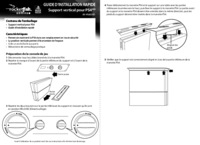
QUICK SETUP GUIDEPS4® Vertical Stand RF-PS4S1014 Carefully set the PS4 system and stand on a table with the bottoms facing up, then attach the stand
90-day limited warrantyVisit www.rocketshproducts.com for details.Contact Rocketfish:For customer support, call 1-800-620-2790 (U.S. and Canada) or 01
Mais documentos para Consolas RocketFish RF-PS4S101 - Quick Setup Guide

Manuais e produtos relacionados com Consolas Rocketfish RF-PS4S101 - Quick Setup Guide
 (2 páginas)
 (2 páginas)
 (1 páginas)
© 2020, manymanuals-pt.com. Todos os direitos reservados. | 0.031 s |
 Manymanuals.com
 Manymanuals.de
 Manymanuals.fr
 Manymanuals.it
 Manymanuals.pl
 Manymanuals.cz
 Manymanuals.es
 Manymanuals-pt.com
Comentários a estes Manuais