RocketFish RF-G1182 Manual do Utilizador

Consulte online ou descarregue Manual do Utilizador para Separadores de vídeo RocketFish RF-G1182. Rocketfish RF-G1182 User's Manual Manual do Utilizador

  • Descarregar
  • Adicionar aos meus manuais
  • Imprimir
  • Página
    / 2
  • Índice
  • MARCADORES
  • Avaliado. / 5. Com base em avaliações de clientes
Vista de página 0
Package contents
• HDMI splitter
AC power adapter
Quick Setup Guide
You will need:
High-speed HDMI cables
RF-G1182
QUICK SETUP GUIDE
Features
Sends HDMI A/V signals from a single source,
such as a Blu-ray/DVD player, set-top box, to
two destinations, such as a TV and A/V receiver.
Supports full 1080p video resolution
Supports 3D video
Compatible with most TV and PC monitor
video resolutions
Two-way HDMI Splitter
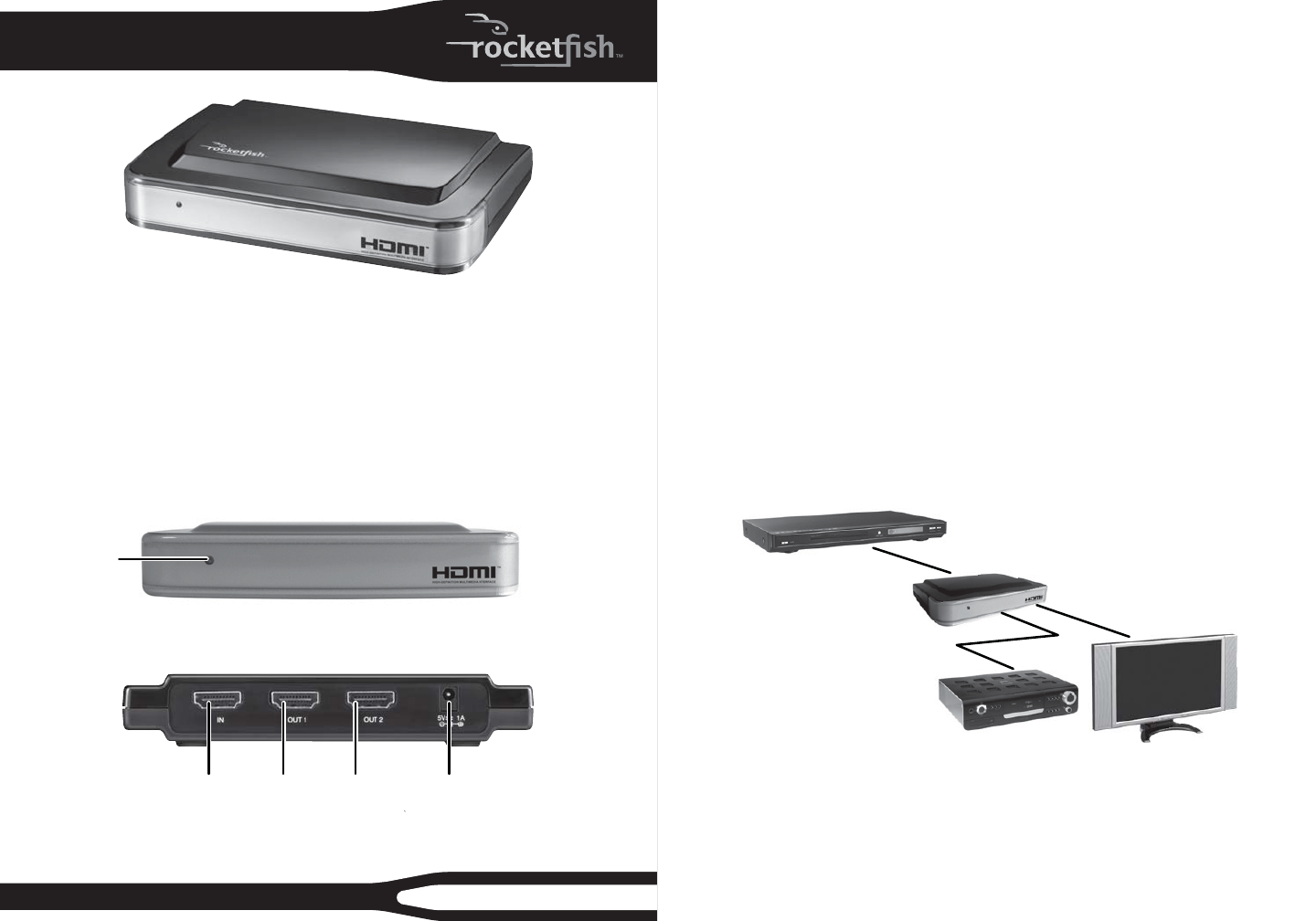
Front
Back
Power LED
HDMI splitter basics
This Rocket sh two-way HDMI splitter will send the HDMI audio and video signals
from a single source, such as a Blu-ray/DVD player or cable/satellite box, to two
destinations, such as a TV and A/V receiver. It is ideal for sending the audio signals
from a 3D Blu-ray player to an A/V receiver that does not support 3D video pass-
thru.
Setting up your HDMI splitter
1 Connect one end of a high-speed HDMI cable (not included) to your video
source and the other end to the IN port on the HDMI splitter.
2 Connect another high-speed HDMI cable to your HDMI splitter’s OUT 1 port to
an HDTV.
3 Connect another high-speed HDMI cable to your HDMI splitter’s OUT 2 port to
an A/V receiver.
4 Connect the included AC adapter from the DC jack on the HDMI splitter to a
standard 110/120V AC outlet. Power on all connected devices and operate per
the manufacturers instructions.
Connecting a TV and A/V receiver to a single HDMI source
HDMI IN port DC power 5V/1A connectorHDMI
OUT 1 port
HDMI
OUT 2 port
HDMI video source
HDMI splitter
HDTV
A/V receiver
HDMI IN
HDMI OUT2
HDMI OUT1
Vista de página 0
1 2

Resumo do Conteúdo

Página 1 - Two-way HDMI Splitter

Package contents• HDMI splitter• AC power adapter• Quick Setup GuideYou will need:• High-speed HDMI cablesRF-G1182QUICK SETUP GUIDEFeatures• Send

Página 2

TroubleshootingSymptom Possible solutionLED is not ON or lit1 Make sure that the HDMI splitter’s power adapter is plugged in.2 Make sure that the vi

Comentários a estes Manuais

Sem comentários